

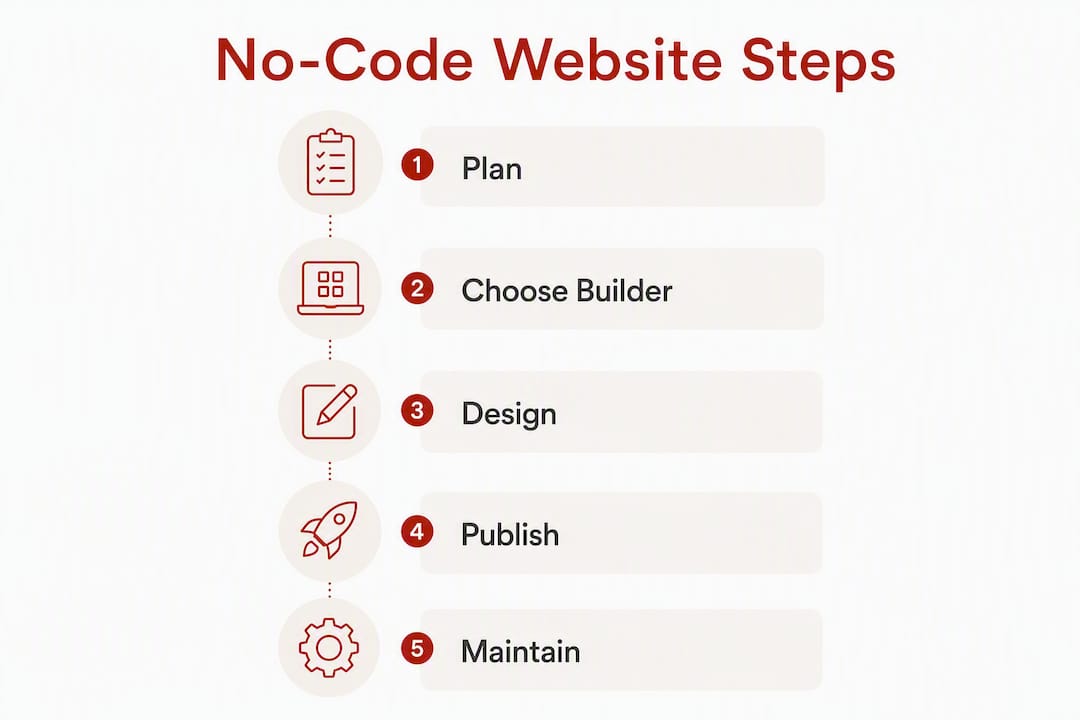
The fastest path to a live, professional website is a no-code builder, a registered domain, and a short launch checklist. Most small business owners can go from blank page to published site in a single day. Here is the sequence:
- Pick your goal (brochure, shop, bookings, portfolio)
- Choose a no-code builder and a template
- Add your core pages and content
- Connect a custom domain and business email
- Test across devices, then publish
Time: a simple brochure site takes a few hours to a day; a site with ecommerce or bookings typically takes three to seven days. Cost: free tiers exist on most platforms, but a professional result usually requires a paid plan (roughly AU$15–AU$25 per month for entry, AU$30–AU$60 per month for mid-tier ecommerce) plus a domain (roughly AU$15–AU$30 per year). If you want a .com.au or .au domain, you will need an Australian Business Number (ABN) or Australian Company Number (ACN) to satisfy auDA eligibility rules.
Table of Contents
- How to create a website online, step by step
- Which no-code builders suit Australian small businesses?
- How long does it take, and what does it cost?
- What are the domain and legal requirements for Australian websites?
- What should your website actually say and look like?
- How do you keep a website secure and up to date?
- When should you hire a professional instead of doing it yourself?
- Key takeaways
- Why governance matters more than the builder you choose
- Marzipan can build and manage your site if you prefer not to DIY
- Useful sources
How to create a website online, step by step
Business.gov.au recommends starting with a clear goal and choosing a host or content management system (CMS) that matches your site’s purpose before you touch a template. That advice holds. Planning for twenty minutes saves hours of rework.
- Define your goal and sitemap. Decide what the site must do: generate enquiries, sell products, take bookings, or simply confirm you exist. List the pages you need (Home, About, Services or Products, Contact, and any legal pages).
- Choose a builder and sign up. Select a hosted, no-code platform suited to your goal (see the next section). Start with a free trial where available.
- Pick a template. Choose one that is close to your intended layout. Changing a template mid-build wastes time, so spend fifteen minutes comparing options before committing.
- Add your pages and populate content. Write short, outcome-led copy. Upload your logo and brand images. Set up your navigation menu.
- Configure on-page SEO basics. Give each page a unique title (50–60 characters) and a meta description (under 160 characters). Use one H1 heading per page and descriptive alt text on every image. These steps directly affect how search engines index your site. For a practical checklist, see Marzipan’s free SEO tips for your new website.
- Set up your domain and business email. Register your domain through your builder or a separate registrar. Connect a professional email address ([email protected] rather than a free Gmail account).
- Test before you publish. Check every page on a mobile device and a desktop browser. Click every link and submit every form. Confirm payment flows work end-to-end. Run a basic accessibility check: can you tab through the page without a mouse? Is the text readable at default zoom? Set up Google Analytics or an equivalent before going live.
- Publish and submit to search engines. Once live, submit your sitemap to Google Search Console. Connect your social media profiles. Publish your Privacy Policy, Terms of Use, and any returns or refund terms in the footer.
- Post-launch: monitor and respond. Check analytics weekly for the first month. Review customer feedback and fix broken links or form errors promptly.
Which no-code builders suit Australian small businesses?
Business.gov.au distinguishes between cloud-based (hosted) CMS platforms, which include hosting and templates in one subscription, and self-hosted solutions, which offer more flexibility but require more technical upkeep. For most small businesses, a hosted platform is the practical choice.

Simple brochure and portfolio sites
Canva’s website builder suits designers, creatives, and service providers who already use Canva for graphics. It produces visually clean pages quickly, with no coding required. The free tier is functional for experimentation, though a custom domain requires a paid plan. GoDaddy’s website builder targets small business owners who want a site live within an hour. Its AI-assisted setup generates a draft site from a short description, and it includes built-in marketing tools and 24/7 support. Both are reasonable starting points for a basic online presence.
Ecommerce and booking sites
If selling products or taking bookings is central to the site’s purpose, choose a builder with native ecommerce or scheduling features. Wix covers both: it offers a wide template library, an integrated online store, and a booking system, with SEO tools built in. Check transaction fees carefully before committing; some platforms charge a percentage of each sale on lower-tier plans.
AI-assisted quick-start builders
Several Australian-market platforms now generate a draft site from a text prompt. GoDaddy’s AI builder and similar tools can produce a usable starting point in minutes. These are useful for getting structure in place quickly, but the generated copy will almost always need editing to reflect your actual services and voice.
Hosted CMS for content-heavy sites
Organisations that publish regular articles, resources, or event listings may outgrow a simple builder. A hosted CMS with blogging and taxonomy features gives more control over content structure and long-term SEO.
What to test during a free trial
Spend thirty to sixty minutes on these checks before committing to a paid plan:
- Can you connect a custom
.com.audomain? - Are ecommerce or booking features available on the plan you can afford?
- How does the site perform on mobile (load speed, layout)?
- Are there built-in SEO fields (page titles, meta descriptions, alt text)?
- Is support available in Australian time zones?
Pro Tip: If a template is already close to your intended layout, use it as-is and change only colours, fonts, and content. Rebuilding a template from scratch takes significantly longer and rarely produces a better result for a first site.
How long does it take, and what does it cost?
Setting realistic expectations at the outset prevents the most common frustration: underestimating the time required to write good content.
Typical timelines
Content is usually the bottleneck, not the builder. Gathering photos, writing service descriptions, and drafting an About page takes longer than most people expect.
Cost bands
- Business email: — often included in mid-tier plans, or available separately for AU$5–AU$10 per month per user.
If your business is registered for GST, display prices inclusive of GST to consumers. The GST registration threshold is AU$75,000 in annual turnover, but showing GST-inclusive pricing is good practice regardless, as it reduces checkout confusion and aligns with consumer expectations under Australian Consumer Law.
For a detailed breakdown of what drives website costs at different budget levels, Marzipan’s guide on charity website costs in Australia covers the same cost drivers that apply to small business sites.
What are the domain and legal requirements for Australian websites?
.au domains and eligibility
The .au namespace (including .com.au, .org.au, .net.au, and .au) is administered by auDA. To register a .com.au domain, an Australian presence such as an ABN or ACN is required, and the domain name must have a close and substantial connection to the registered business or brand name.
Registering through an auDA-accredited registrar is straightforward. The process takes minutes once you have your ABN ready.
Australian Consumer Law
Australian Consumer Law (ACL) applies to any business selling to Australian consumers, regardless of where the business is based. The ACL prohibits misleading or deceptive conduct, requires honest advertising, and mandates that consumer guarantees (including the right to a repair, replacement, or refund for faulty goods) are clearly communicated. Your website must not make claims about products or services that are false or likely to mislead.
Privacy and data obligations
The Privacy Act 1988 and the Australian Privacy Principles (APPs) generally apply to businesses with annual turnover above AU$3 million, but exceptions exist for certain activities, including health service providers and some government contractors. Even if your business falls below the threshold, publishing a clear Privacy Policy is standard practice and reduces reputational risk. Any site that uses analytics tools, contact forms, or email marketing is collecting personal information.
Legal compliance checklist before launch
- Privacy Policy (accessible from every page that collects data, typically via the footer)
- Website Terms of Use
- Returns and refund policy (if selling goods or services)
- GST-inclusive pricing displayed to consumers
- Unsubscribe option in all marketing emails (Spam Act 2003 requirement)
- Cookie or analytics disclosure where tracking technologies are in use
Pro Tip: Place your Privacy Policy, Terms of Use, and returns policy links in the site footer. Business Queensland recommends making these pages easy to find at checkout and on any page that collects personal information. A footer link on every page satisfies that requirement with minimal effort.
What should your website actually say and look like?
Good design and good content serve the same goal: a visitor who arrives on your site should immediately understand what you do, who you serve, and what to do next.
Design priorities
Business.gov.au emphasises mobile compatibility, accessibility, and clear navigation as core design requirements. A mobile-first layout is not optional; the majority of Australian web traffic arrives on a phone. Choose a template that renders cleanly at small screen sizes before you consider anything else.
Keep the visual hierarchy simple: one primary call to action per page, consistent brand colours and fonts, and enough white space that the page does not feel crowded. Avoid full-width background videos and heavy image carousels on the home page; they slow load times and rarely improve conversion.
Content priorities
Lead each page with the outcome you deliver, not a description of your process. “We help Sydney tradies get more enquiries online” is more useful to a visitor than “We are a digital marketing agency founded in 2018.” Keep paragraphs short. Put your phone number and email address where they are easy to find, not buried in a contact form three clicks away.
Accessibility checklist
For Australian organisations, particularly those serving the public or receiving government funding, WCAG accessibility standards are increasingly expected. At a minimum:
- Add descriptive alt text to every image
- Confirm the site is navigable by keyboard alone
- Check colour contrast ratios (a contrast checker tool takes under a minute)
- Use plain language and avoid jargon
SEO and performance at launch
Set a unique page title and meta description for every page. Use descriptive, readable URLs (yourdomain.com.au/services rather than yourdomain.com.au/page?id=3). Compress images before uploading; large image files are the single most common cause of slow load times on small business sites. Connect Google Analytics or an equivalent from day one so you have baseline data.
How do you keep a website secure and up to date?
A published site requires ongoing attention. The minimum maintenance burden is low, but ignoring it creates compounding risk.
Routine maintenance checklist
- Weekly: check for broken links, review analytics for unusual drops in traffic, and scan for error messages.
- Monthly: update plugins, themes, and CMS software if on a self-hosted platform; review contact form submissions and spam filters; back up the site.
- Annually: renew your domain and hosting subscription; review legal pages for accuracy; audit the site for outdated content, broken links, and accessibility issues.
Security basics
- Use a strong, unique password for your hosting and CMS accounts, and enable two-factor authentication.
- Confirm your site runs on HTTPS (most hosted builders handle this automatically via an SSL certificate).
- If you accept payments, use a reputable payment gateway (Stripe and PayPal are both widely used in Australia) rather than storing card details yourself.
- Review your analytics and tracking setup annually. Adding new tracking pixels or third-party scripts may trigger obligations under the Privacy Act or require an updated cookie disclosure.
Backup and restore
Most hosted builders include automatic backups. If yours does not, or if you are on a self-hosted CMS, schedule weekly backups to an off-site location. Test the restore process at least once a year; a backup you have never tested is not a reliable backup.
When should you hire a professional instead of doing it yourself?
A no-code builder is the right tool for many small business websites. It is not the right tool for every situation. The decision comes down to complexity, risk, and the cost of getting it wrong.
Signs that a professional build is worth considering
- The site requires custom integrations (a bespoke CRM, a complex booking system, or a third-party API)
- You are selling a significant volume of products and need reliable inventory management
- Strict accessibility compliance is required (for example, a government-funded service or a disability support organisation)
- The site will carry sensitive data or handle regulated transactions
- You need multi-language support or serve a geographically distributed audience
- You do not have time to learn the platform and maintain it yourself
What a specialist agency does differently
A professional agency handles strategy, information architecture, accessibility auditing, performance optimisation, and ongoing governance. For organisations where the website is a primary service delivery channel rather than a marketing brochure, the cost of a poor build is measured in lost trust, not just lost traffic.
Marzipan works with purpose-driven organisations across Australia on strategy, build, accessibility, sustainable hosting, and SEO. For readers who want to understand what a professional engagement looks like before deciding, the step-by-step web design guide for Sydney businesses outlines the process in plain terms.
Key takeaways
A no-code website builder, a registered .com.au domain, and a clear launch checklist are sufficient for most Australian small business websites.
| Point | Details |
|---|---|
| Start with a goal | Define what the site must do before choosing a builder or template. |
| Budget realistically | Expect AU$15–AU$60 per month for a paid plan (depending on ecommerce and features), plus AU$15–AU$30 per year for a domain. |
| Meet Australian legal requirements | Publish a Privacy Policy, Terms of Use, and ACL-compliant refund terms before launch. |
| Maintain the site regularly | Schedule monthly backups, software updates, and an annual content and accessibility review. |
| Know when to hire a specialist | Custom integrations, strict accessibility needs, or high-traffic sites benefit from professional build and governance. Consider Marzipan for strategy, build, and ongoing SEO. |
Why governance matters more than the builder you choose
The choice of website builder matters less than most guides suggest. Canva, Wix, and GoDaddy are all capable platforms for a small business site. What determines whether a site actually serves its audience is the quality of the decisions made before and after the build: what the site is for, who it is for, whether it is accessible, whether the legal pages are accurate, and whether someone is responsible for keeping it current.
Organisations that treat a website as a one-time project rather than an ongoing responsibility tend to end up with sites that are slow, outdated, and legally exposed within two years. The maintenance cadence described earlier in this article is not optional housekeeping. It is the minimum required to keep a site trustworthy.
There is also a sustainability dimension that rarely appears in no-code builder marketing. Hosting infrastructure has a real energy footprint. Choosing a provider that uses renewable energy, or working with an agency that prioritises green website hosting, is a decision that aligns with the values many purpose-driven organisations already hold. It costs nothing extra to ask the question.
The most durable websites are built with clear purpose, maintained with discipline, and designed to serve the people who use them rather than to impress the people who built them.
Marzipan can build and manage your site if you prefer not to DIY
For small businesses and community organisations that decide to outsource, Marzipan offers strategy, design, build, accessibility auditing, and ongoing SEO from Sydney. The work is scoped to fit the organisation, not a fixed package.
When taking on a new site build, Marzipan typically asks for: your business goal and primary audience, the pages and features you need, any existing brand assets (logo, colours, fonts), and your domain and hosting situation. That information is enough to scope a project and provide a clear estimate.
If search visibility is the priority, the search visibility service covers technical SEO, content strategy, and ongoing performance monitoring for purpose-driven organisations. Get in touch through the website to discuss your requirements.
Useful sources
| Resource | What it covers |
|---|---|
| Set up a business website — business.gov.au | Australian government guidance on hosting, CMS choice, design, and launch |
| Guide to starting a business — business.gov.au | Broader starting-a-business context including domain and website setup |
| Legal obligations for online businesses — Business Queensland | Privacy Policy, Terms of Use, and consumer-facing legal requirements |
| Setting up a business website in Australia — Sprintlaw | ACL, Privacy Act, GST pricing, Spam Act and .au domain eligibility |
| auDA — .au Domain Administration | Official rules for .au namespace registration and eligibility |
| ACCC — Australian Consumer Law | Consumer guarantees, misleading conduct, and pricing obligations |
| How to make a website for a business — Marzipan | Marzipan’s practical guide to business website structure and content |
| WCAG accessibility for Australian not-for-profits — Marzipan | Accessibility standards and practical guidance for Australian organisations |


