

A technical SEO audit is a systematic check of how search engines discover, render, and index a site. It covers crawlability, site architecture, Core Web Vitals, indexation, and structured data. Run it in the right order, because Google’s crawl process follows a precise sequence: discovery, fetch, render, index, then rank. Fixing an issue that sits downstream of a broken upstream process wastes effort.
The core checkpoints for any technical SEO audit checklist are:
- Crawlability and indexing: robots.txt, XML sitemap, canonical tags, noindex usage, hreflang
- Site architecture: click depth, internal linking, orphan pages, breadcrumbs
- Performance: Core Web Vitals (LCP, INP, CLS), image optimisation, render-blocking resources
- Mobile usability: mobile-first parity, JavaScript rendering, AMP alternatives
- Structured data: schema.org validation, rich result eligibility
- Security: HTTPS, HSTS, Content-Security-Policy, mixed content
- Duplicate content and URL structure: canonical configuration, parameter handling, meta tag duplication
Audit sequencing matters. A crawl block makes every downstream finding irrelevant. Prioritise by dependency first, then by business impact.
How to audit crawlability and indexing issues

Crawlability problems are the most damaging class of technical issue because they prevent Google from reaching content at all. The most common cause is a staging configuration deployed to production by accident. A Disallow: / in robots.txt, or a template-level noindex tag, can remove pages from search results within days without any obvious browser-side warning.
Check these items in order:
- robots.txt: Fetch the file on every subdomain. A 404 response is acceptable; a 500 or timeout causes Googlebot to pause crawling entirely. Verify no important directories are blocked.
- XML sitemap: Confirm the sitemap returns a valid 200 response, that every listed URL also returns 200, and that all indexable pages on the site appear in it. Silent sitemap failures are common in WordPress and headless CMS deployments.
- Canonical tags: Every indexable page needs a canonical tag pointing to the preferred URL. Check for self-canonicals that point to a different protocol or trailing-slash variant, canonicals pointing to redirected or noindexed pages, and duplicate canonical tags on the same page.
- noindex usage: Audit every occurrence in the codebase. Confirm that only intended pages carry the tag: internal search results, filtered views, login pages, and draft preview routes.
- Redirect chains: Chains longer than two hops negatively affect crawl budget and user latency, and trigger Google Search Console warnings. Two hops is the practical maximum.
- hreflang: For Australian sites targeting international audiences, hreflang annotations must be reciprocal and use correct ISO 639-1 language codes with ISO 3166 country codes. A common error is using
en-AUcorrectly but omitting the reciprocal tag on the target-language page.
Pro Tip: Run the robots.txt tester immediately after any infrastructure deployment, not just during scheduled audits. Staging configurations are the most frequent source of production crawl failures.
Does your site architecture support efficient crawling?
Site structure determines how efficiently Google distributes crawl budget and how well PageRank flows to important pages. Key pages should be reachable within three clicks from the homepage, and no important page should exist without inbound internal links.
Audit these structural elements:
- Click depth: Map how many clicks separate the homepage from each key page. Pages buried beyond three clicks receive less crawl attention and weaker ranking signals.
- Orphan pages: Export your full URL list and cross-reference it with the set of pages reachable via internal links. Pages with zero inbound internal links have no PageRank flowing in, even if they appear in the sitemap.
- Internal link quality: Review anchor text distribution, broken internal links (4xx and 5xx responses), and whether link equity concentrates on the pages that matter commercially.
- Breadcrumbs: Confirm breadcrumb markup is present and consistent with the URL hierarchy. Breadcrumbs help both users and crawlers understand page relationships.
- Navigation consistency: Check that pages moved from primary navigation to footer-only placement still receive adequate internal links from relevant content pages.
For mission-driven organisations managing large content libraries, this structural audit often reveals pages that were once well-linked but have drifted into obscurity after redesigns. A focused SEO audit for community organisations can surface these gaps efficiently.
Are your Core Web Vitals and mobile experience up to standard?
Google measures page experience through Core Web Vitals at the 75th percentile of real user data, not lab tests. The target thresholds for Core Web Vitals are LCP at or below 2.5 seconds, INP at or below 200 milliseconds, and CLS at or below 0.1, all measured at the 75th percentile of real user data.
Check the following:
- LCP: The most common cause of a failing LCP score is an unoptimised hero image. Switch from JPEG to WebP, set explicit width and height attributes, and add
fetchpriority="high". Render-blocking CSS in the document head is the second most frequent cause. - INP: Long tasks from third-party scripts (analytics, chat tools, session recording) are the usual culprit. Defer non-critical scripts to load after user interaction.
- CLS: Form embeds and CRM widgets frequently cause layout shifts. Reserve space for dynamic elements with explicit dimensions.
- Mobile-first parity: Google indexes the mobile version of a page. Confirm the mobile DOM contains the same content and internal links as the desktop version.
- JavaScript rendering: Use Google Search Console’s URL Inspection tool to compare the rendered HTML against what you expect. Critical content missing from the rendered output indicates a rendering problem, not a content problem.
- AMP: For most Australian sites, AMP is no longer the preferred path. Modern performance techniques applied to standard pages achieve equivalent or better Core Web Vitals scores with less maintenance overhead.
Tools for this layer include PageSpeed Insights, the Chrome User Experience Report (CrUX), and Google Search Console’s Core Web Vitals report.
Checking structured data, HTTPS, and key technical elements

Structured data must be valid, error-free, and aligned with page content to enable rich SERP features and support AI-driven search extraction. Schema types relevant to most Australian organisations include Article, Organisation, LocalBusiness, FAQPage, and BreadcrumbList.
Security and HTTP header configuration also carry direct SEO implications:
- HTTPS: Every URL must redirect to HTTPS. The certificate must be valid and cover the apex domain, www subdomain, and any other subdomains in active use.
- HSTS: The HTTP Strict Transport Security header should appear on every HTTPS response. Begin with a short
max-agevalue and extend to one year once the configuration is stable. - Content-Security-Policy: A CSP header that restricts inline scripts and limits external origins reduces both security risk and mixed content issues. Mixed content degrades Core Web Vitals and triggers browser security warnings.
- X-Frame-Options: Set this header or use the
frame-ancestorsCSP directive to prevent clickjacking. - Schema validation: Use Google’s Rich Results Test and Schema.org’s validator to confirm markup is error-free. Invalid structured data is silently ignored rather than flagged in rankings.
Validate schema on every key template, not just the homepage. Product pages, service pages, and article templates each carry different schema requirements.
How to identify and fix duplicate content and URL structure issues
Duplicate content dilutes ranking signals by splitting them across multiple URLs that Google treats as competing versions of the same page. The most common sources are parameter-based URL variants, trailing-slash inconsistencies, and thin paginated pages.
Work through these checks:
- Canonical configuration: Confirm that canonical tags consistently point to the preferred URL across all variants. A page accessible at both
example.com.au/pageandexample.com.au/page/without a canonical creates a duplication signal. - Parameter handling: URL parameters for sorting, filtering, and session tracking generate large numbers of near-duplicate pages. Use Google Search Console’s URL parameters tool or canonical tags to consolidate these.
- Meta tag duplication: Duplicate title tags across many pages indicate a template-level problem. Each indexable page needs a unique, descriptive title of 55–60 characters. Duplicate meta descriptions have lower direct SEO impact, but they signal template issues worth correcting.
- Thin content: Pages with minimal unique content are candidates for consolidation, noindex, or deletion. Audit low-word-count pages against their traffic and conversion data before acting.
- Audit tools: Screaming Frog and Sitebulb both surface duplicate content patterns efficiently. Cross-reference crawl findings with Google Search Console’s Page Indexing report to confirm which duplicates Google has actually encountered.
For organisations managing content across multiple service areas or locations, parameter handling and canonical configuration are the two issues most likely to cause measurable indexation loss.
Prioritising fixes for Australian websites: beyond the checklist
A flat list of audit findings is not a plan. The audits that produce results treat findings as inputs to a decision, not a to-do list. Impact-driven prioritisation evaluates each issue across four dimensions: business impact, reach (how many pages are affected), root cause severity, and execution feasibility.
This approach changes which issues get addressed first. Consider two common findings:
- Duplicate meta descriptions across 800 pages: High reach, low business impact, low root cause severity. Worth resolving eventually, but rarely urgent.
- Revenue-driving templates excluded from crawl paths: Moderate reach, high business impact, high root cause severity. This should be addressed first, regardless of how many pages are affected.
Severity scores alone do not capture business context, template importance, or implementation constraints. A technically “critical” issue on a low-value page may matter less than a moderate issue on a high-conversion template.
Practical workflow for Australian organisations:
- Score each finding across the four dimensions using a simple 1–5 scale.
- Group findings by pattern (redirect chains, canonical conflicts, crawl exclusions) rather than by individual URL.
- Sequence fixes in waves: low-risk, high-return changes first; complex architecture changes later.
- Assign a named owner to each fix before handing the audit over. Crawlability and indexation fixes typically sit with marketing or SEO; Core Web Vitals and JavaScript rendering belong to engineering.
- Schedule regression checks after each deployment. A fix that is not verified is a fix you are guessing about.
Marzipan’s approach to ethical SEO for mission-driven sites applies this same prioritisation logic, with additional weight given to accessibility, sustainability, and long-term site health over short-term ranking gains.
Pro Tip: Before presenting audit findings to stakeholders, translate each high-priority issue into a business consequence: “This crawl exclusion means Google cannot index our services pages” lands differently than “There is a robots.txt error.” Stakeholder buy-in follows from business language, not technical labels.
What server logs reveal that crawl tools miss
Crawl tools show you what is on the site. Server logs show you what Google actually requested. The two datasets rarely match perfectly, and the gaps between them are where significant issues hide.
Log file analysis answers questions that no crawler can: which URLs is Googlebot visiting most frequently, which pages have not been crawled in 90 days or more, and whether crawl budget is being spent on low-value parameterised URLs rather than on content that matters.
The practical process involves exporting Googlebot requests from server logs (verified by reverse DNS to confirm they are genuine), then cross-referencing with Google Search Console’s Crawl Stats report and the Page Indexing report. Anomalies to investigate include: high crawl frequency on redirect chains, zero crawl activity on recently published pages, and disproportionate crawl spend on filtered or paginated URLs.
For large Australian sites with thousands of pages, log analysis is the most reliable way to confirm that crawl budget is allocated to the pages with the highest commercial value. Search Console’s Crawl Stats report aggregates and samples; logs give per-URL, per-hour resolution.
Which tools support a thorough SEO audit?
The right tools depend on audit scope, but a small set covers the majority of technical checks reliably.
Crawl and site analysis:
- Screaming Frog SEO Spider: The standard for desktop crawls. Exports status codes, canonicals, redirects, and indexability for every URL. Run it with JavaScript rendering enabled to surface client-side content issues.
- Sitebulb: Provides visual crawl maps and prioritised issue reporting, useful for communicating findings to non-technical stakeholders.
Google’s own tools:
- Google Search Console: The Page Indexing report, Core Web Vitals report, and Crawl Stats report are primary data sources for any audit. Cross-reference crawl findings here before drawing conclusions.
- PageSpeed Insights: Combines lab data with real-user CrUX data for Core Web Vitals assessment.
- URL Inspection tool: Confirms what Google actually sees when it renders a specific page.
Structured data and schema:
- Google Rich Results Test: Validates schema markup and previews rich result eligibility.
- Schema.org Validator: Checks markup against the Schema.org specification independently of Google’s rendering.
For teams looking to reduce audit time through AI-assisted analysis, resources on AI-powered audit tools offer practical guidance on where automation adds genuine value and where human judgement remains necessary.
A free SEO audit template built around these tools provides a consistent starting point. Structure it as a spreadsheet with columns for the check, the tool used, the pass/fail threshold, the finding, the priority score, and the assigned owner.
A step-by-step audit methodology that actually gets finished
Most audits stall because they produce findings without a clear sequence for acting on them. The five-stage loop of Crawl, Diagnose, Prioritise, Fix, and Verify converts a flat issue list into a repeatable process.
Stage 1: Crawl. Run Screaming Frog or Sitebulb with JavaScript rendering enabled. Export status codes, canonicals, redirects, and indexability for every URL. Pull server logs for the same period.
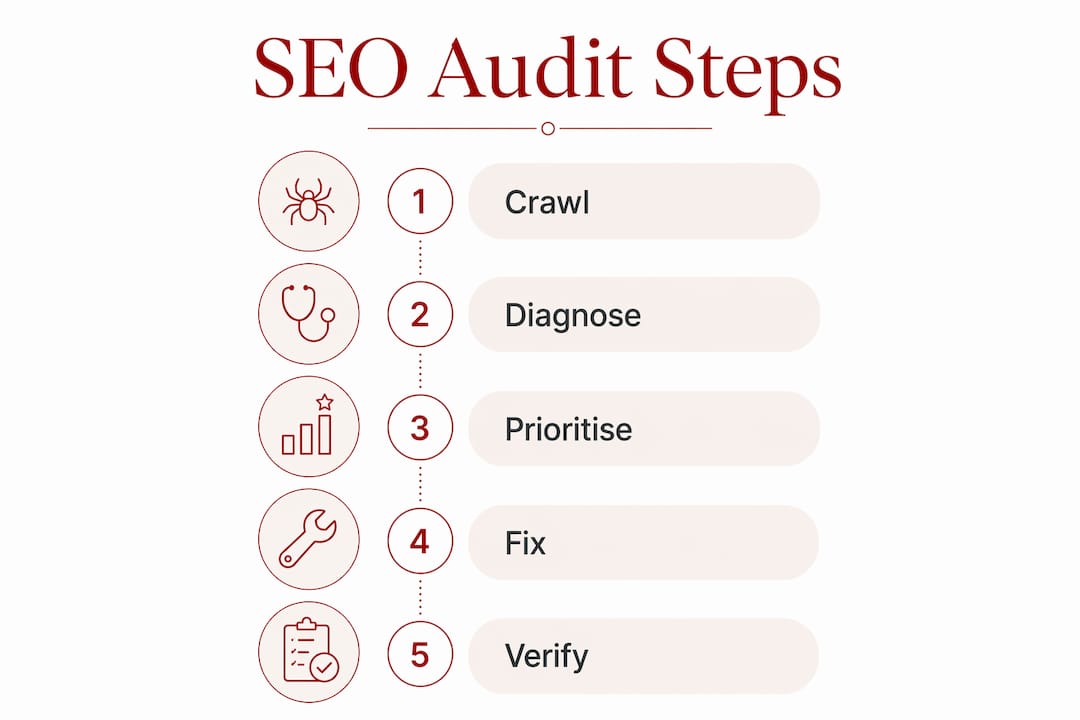
Stage 2: Diagnose. Cross-reference crawl data with Google Search Console’s Page Indexing report and Core Web Vitals data. Separate genuine problems from noise. Cluster findings by pattern rather than by individual URL.
Stage 3: Prioritise. Score each pattern by business impact, reach, root cause severity, and feasibility. Rank the list. The three to five issues at the top of that ranked list are where the audit’s value lies.
Stage 4: Fix. Assign a named owner to each prioritised finding. Crawlability and indexation fixes sit with SEO or marketing. Core Web Vitals and rendering issues belong to engineering. Ship the highest-impact items first.
Stage 5: Verify. Use the Validate Fix flow in Google Search Console, re-crawl affected URLs, and re-test Core Web Vitals once field data refreshes over the 28-day CrUX window. A fix that has not been verified has not been completed.
Run a full audit once or twice a year, with quarterly spot-checks on high-value pages and a dedicated audit before and after any site migration. For Australian nonprofits and community organisations, a structured audit process guide can help adapt this methodology to smaller teams and tighter resource constraints.
Marzipan works with purpose-driven Australian organisations to build and maintain websites that perform well in search without compromising on values. If your site needs a structured technical review, search visibility services are available for mission-led organisations across Australia.
Key takeaways
A technical SEO audit produces results only when findings are sequenced by dependency and prioritised by business impact, not by the volume of issues a crawler surfaces.
| Point | Details |
|---|---|
| Audit order follows Google’s process | Fix crawlability before indexation, indexation before performance, to avoid wasted effort on downstream issues. |
| Core Web Vitals have fixed thresholds | LCP at or under 2.5s, INP at or under 200ms, CLS at or under 0.1, all measured at the 75th percentile of real user data. |
| Impact-driven prioritisation changes outcomes | Evaluate each finding by business impact, reach, root cause severity, and feasibility rather than severity labels alone. |
| Log files reveal what crawlers miss | Server logs show which URLs Google actually requests, exposing crawl budget waste that crawl tools cannot detect. |
| Verification closes the loop | Re-crawl affected URLs and confirm fixes in Google Search Console before marking any issue as resolved. |


