

TL;DR:
- An SEO audit checklist identifies technical, content, and AI readiness issues that affect website visibility. Regular, prioritized audits using standard tools help prevent technical debt and improve rankings. Including AI readiness ensures sites are prepared for evolving search landscape changes.
An SEO audit checklist is a structured framework for identifying technical, on-page, content, and AI readiness issues that reduce a website’s visibility in search results. Without one, 10–30% of potential organic traffic is lost to issues that a systematic review would catch. This guide covers the tools, steps, and reporting practices needed to run a thorough audit, whether you are a digital marketer reviewing a client site or a website owner assessing your own. It draws on current audit methodology, including Google Search Console, Screaming Frog, and PageSpeed Insights, to give you a process that produces results rather than just data.
What tools and preparation does an SEO audit require?

A well-prepared audit produces cleaner findings and fewer wasted hours. Before running a single crawl, confirm you have verified ownership of the site in Google Search Console and that Google Analytics is collecting data correctly. These two platforms are non-negotiable starting points for any audit.
For crawling, Screaming Frog is the standard choice. The free version crawls up to 500 URLs, which covers most small sites. Larger sites require the paid licence or a segmented crawl approach. PageSpeed Insights and the Core Web Vitals report inside Google Search Console handle performance assessment.
Preparation also means setting up your documentation before you start. A structured spreadsheet logging each issue by severity, URL, fix description, and status keeps the audit organised and makes follow-up straightforward. Without this, findings get lost between the crawl and the fix.
Pro Tip: Verify robots.txt and your XML sitemap are accessible before crawling. A misconfigured robots.txt can block Screaming Frog from crawling key sections, producing an incomplete picture from the outset.
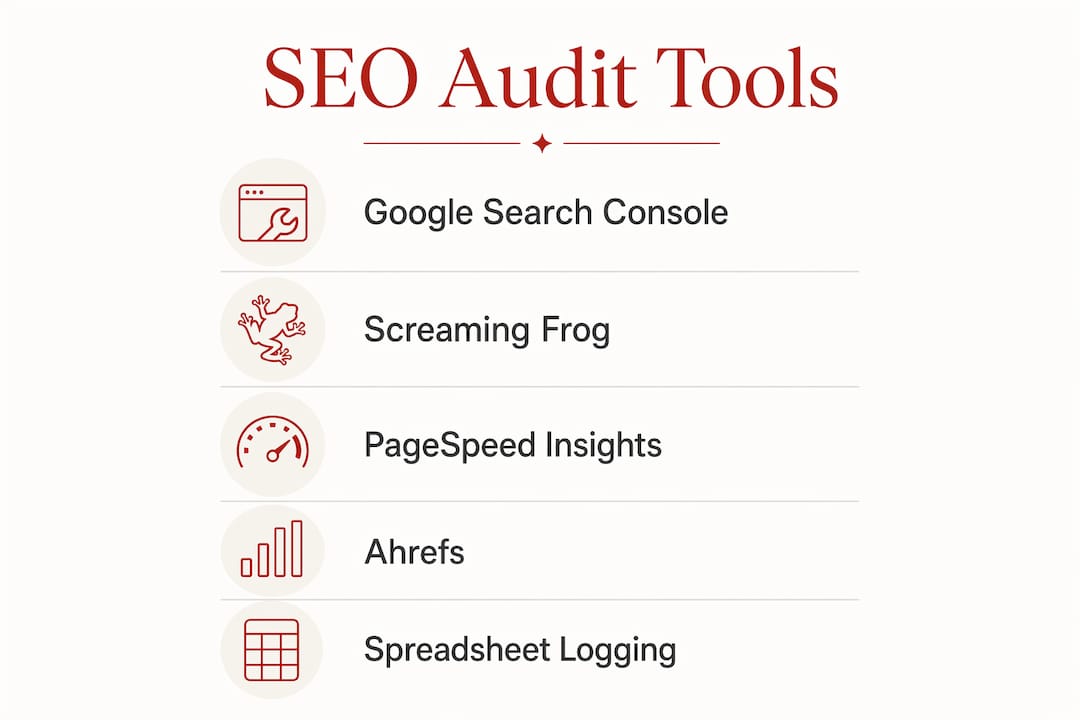
The table below summarises the core tools and their primary function in the audit process.
| Tool | Primary function |
|---|---|
| Google Search Console | Indexation status, coverage errors, Core Web Vitals |
| Google Analytics | Traffic trends, bounce rate, conversion data |
| Screaming Frog | Site crawl, broken links, redirect chains, metadata |
| PageSpeed Insights | Page speed scores, Core Web Vitals diagnostics |
| Ahrefs or similar | Backlink profile, keyword rankings, site health score |
How to run an SEO audit across technical, on-page, and content areas
The most reliable way to audit a website for SEO is to work in a fixed sequence. Resolving technical issues first is not optional. If pages cannot be crawled or indexed, content improvements and backlink work produce no ranking benefit.
Technical SEO checks
Start with crawlability and indexation. Confirm that your robots.txt is not blocking important pages and that your XML sitemap is submitted to Google Search Console. Check for canonical tag errors, which cause Google to index the wrong version of a page. Review redirect chains, as multiple hops slow load times and dilute link equity.
- Confirm robots.txt allows crawling of key page types
- Verify XML sitemap is submitted and error-free in Google Search Console
- Identify and resolve canonical tag conflicts
- Audit redirect chains and replace multi-hop redirects with direct 301s
- Check for orphaned pages with no internal links pointing to them
On-page SEO checks
Once technical foundations are sound, review on-page elements. Each page should have a unique title tag within 50–60 characters and a meta description that accurately reflects the content. Header structure should follow a logical H1, H2, H3 hierarchy. URLs should be short, descriptive, and free of unnecessary parameters.
A common finding at this stage is duplicate or near-duplicate title tags across multiple pages. This signals to Google that the pages compete with each other, which suppresses rankings for both.
Content quality and keyword alignment
Thin content, defined as pages with little substantive information, is a persistent issue on sites that have grown without a content strategy. Identify pages with low word counts and high bounce rates. Check for keyword cannibalisation, where two or more pages target the same term and split ranking signals.
Pro Tip: Use the URL inspection tool in Google Search Console to check how Google renders individual pages. JavaScript-heavy sites sometimes serve different content to crawlers than to users, which creates indexation gaps that are invisible in a standard crawl.
Core Web Vitals and page speed
Core Web Vitals measure loading performance, interactivity, and visual stability. Google uses these signals as a ranking factor. PageSpeed Insights gives a per-page breakdown, while Google Search Console provides a site-wide view. Page speed directly affects SEO rankings, and poor scores on mobile are particularly damaging given the proportion of search traffic on handheld devices.
Schema markup and AI readiness
Structured data, implemented via Schema.org markup, helps search engines understand page content and qualify pages for rich results. Check that existing schema is valid using Google’s Rich Results Test. Missing or broken schema is a straightforward fix with a measurable impact on click-through rates.
Modern SEO audits now include an AI search visibility section covering LLM citation signals and AI Overview eligibility. This means reviewing whether content is structured clearly enough for large language models to cite it, whether FAQ and how-to markup is present, and whether the site appears in AI-generated search summaries. Excluding this dimension from an audit means missing signals that are increasingly relevant to organic visibility.
A weighted scoring framework assigns crawlability 20%, on-page SEO 18%, Core Web Vitals 15%, internal linking 12%, schema 10%, backlinks 10%, content quality 8%, and AI readiness 7%. These weights reflect relative ranking impact and provide a useful guide for prioritising fixes when time is limited.
The comparison below shows how a standard audit scope differs from a modern one that includes AI readiness.
| Audit area | Standard audit | Modern audit (2026) |
|---|---|---|
| Technical SEO | Crawlability, indexation, redirects | Same, plus JavaScript rendering checks |
| On-page SEO | Title tags, meta, headers | Same, plus entity optimisation |
| Content | Thin content, duplication | Same, plus LLM citation structure |
| Performance | Core Web Vitals, page speed | Same, plus mobile-first scoring |
| AI readiness | Not included | AI Overview eligibility, LLM signals |
How to report and prioritise SEO audit findings
Overwhelming stakeholders with detailed data dumps is the most common failure in audit reporting. A well-structured report leads with an executive summary covering the overall site health score and its estimated revenue or traffic impact. Detail follows in appendices for those who need it.
The most practical way to structure findings is the impact versus effort matrix, using a P0 to P3 classification:
- P0: Critical issues blocking indexation or causing significant traffic loss. Fix immediately.
- P1: High-impact issues with moderate effort. Schedule within the current sprint.
- P2: Medium-impact improvements. Plan for the next quarter.
- P3: Low-impact or cosmetic issues. Address when capacity allows.
A successful audit report segments findings this way to prevent overwhelm and enable prioritised action. This structure also makes it easier to assign work across teams. Developers need specific technical instructions. SEO specialists need keyword and content guidance. Executives need a clear link between findings and business outcomes.
“Audit reports must prioritise getting action via clear roadmaps rather than overwhelming clients with raw data.”
AI readiness findings deserve their own section in the report. As AI-generated search summaries become a primary discovery channel, communicating whether a site is positioned to appear in them is a legitimate business concern, not a technical footnote. For organisations conducting SEO audits for mission-driven sites, this framing helps leadership understand why content structure and schema matter beyond traditional rankings.
What are the most common SEO audit mistakes?
Scope creep is the most frequent problem in practice. Audits that attempt to cover everything at once produce long lists of findings that no team can act on. A more useful approach is to segment large sites into sections and audit each section in turn.
Audits for small sites under 500 pages typically take 4–8 hours. Larger or more complex sites can require 2–4 days or more. Setting realistic time expectations at the outset prevents the audit from stalling before it produces usable output.
Other common mistakes include:
- Treating crawl errors as confirmed problems without validating them manually
- Ignoring false positives in indexation reports, particularly for intentionally noindexed pages
- Reporting technical findings to executives without translating them into business terms
- Skipping a retest after fixes are implemented, which means there is no confirmation that issues were resolved
Pro Tip: Schedule quarterly SEO audits rather than treating audits as one-off projects. Sites accumulate technical debt between audits, and quarterly reviews catch regressions before they compound into significant traffic losses.
For teams managing large sites, a segmented approach works well. Audit the homepage and top-level category pages first, then work through product or content sections. This produces a prioritised fix list faster than a full-site crawl that takes days to complete. For community organisations and nonprofits, the SEO audit steps guide for Australian nonprofits offers a practical framework adapted for smaller teams with limited technical resources.
Key takeaways
A thorough SEO audit checklist covers technical foundations, on-page elements, content quality, Core Web Vitals, schema markup, and AI readiness, then translates findings into a prioritised action plan.
| Point | Details |
|---|---|
| Technical issues come first | Crawlability and indexation must be resolved before content or backlink work has any effect. |
| Use a fixed tool set | Google Search Console, Screaming Frog, and PageSpeed Insights cover the core audit requirements. |
| Prioritise with P0–P3 | Classify findings by impact and effort to produce a roadmap teams can act on. |
| Include AI readiness | Audit for LLM citation signals and AI Overview eligibility as a standard section, not an optional extra. |
| Audit quarterly | Regular reviews prevent technical debt from accumulating and protect organic traffic over time. |
Why prioritisation matters more than thoroughness
The audits I have seen fail are not the ones that missed a technical issue. They are the ones that found everything and communicated nothing clearly. A 200-item crawl report handed to a development team without context produces inaction, not fixes.
The shift I would encourage is to treat the audit as a governance document, not a technical inventory. Every finding should connect to a business outcome. A broken redirect chain is not just a crawl error. It is a page that users cannot reach and that Google may not index. Framed that way, it gets fixed.
The inclusion of AI readiness in modern audits reflects a genuine change in how search works. Large language models now surface content in ways that bypass traditional blue-link rankings entirely. A site that is not structured for AI citation is invisible in a growing share of search interactions. That is a business risk worth naming in any audit report, regardless of the organisation’s size or sector.
Technical foundations remain non-negotiable. No amount of content quality or backlink work compensates for pages that cannot be crawled. But the organisations that get the most from their audits are the ones that connect technical findings to strategic priorities and communicate them in terms that decision-makers can act on.
— Ben
SEO support for purpose-driven organisations
Com works with mission-led organisations that need their websites to perform reliably in search, without compromising on ethics or sustainability. If your audit has surfaced issues that require professional attention, the AI-informed SEO services at Marzipan address both traditional ranking factors and emerging AI search visibility. For organisations that need broader support, the digital marketing services team builds campaigns that align with your values and your audience. Com is based in Sydney and works with high-trust organisations across Australia.
FAQ
What is an SEO audit checklist?
An SEO audit checklist is a structured list of checks covering technical SEO, on-page elements, content quality, Core Web Vitals, schema markup, and AI readiness. It provides a repeatable process for identifying issues that reduce a site’s organic visibility.
How long does an SEO audit take?
Small sites under 500 pages typically require 4–8 hours. Larger or more complex sites can take 2–4 days or more, particularly when content and backlink analysis are included alongside technical checks.
How often should I audit my website for SEO?
Quarterly audits are the recommended standard. Regular reviews prevent technical debt from building up and allow teams to catch regressions before they affect organic traffic significantly.
What tools do I need to audit a website for SEO?
Google Search Console, Screaming Frog, and PageSpeed Insights cover the core requirements. Ahrefs or a similar platform adds backlink and keyword ranking data for a more complete picture.
Should an SEO audit include AI search readiness?
Yes. Modern audits include a section on LLM citation signals and AI Overview eligibility. As AI-generated search summaries become a primary discovery channel, this dimension is now a standard part of any thorough site review.


