

TL;DR:
- Web content for community organizations tends to become outdated and cluttered without effective governance, roles, and regular maintenance. Implementing clear content lifecycle policies, choosing accessible CMS and DAM tools, and establishing consistent auditing and review routines are essential for reliable, accessible, and discoverable online presence. Prioritizing governance, accessibility, and patience with content performance metrics ensures trust and sustainability in managing community websites effectively.
Web content at community organisations tends to accumulate quietly. Pages go out of date, ownership becomes unclear, and what started as a tidy site gradually fills with inconsistent, inaccessible, or redundant material. Knowing how to manage web content effectively is not simply a technical matter. It requires governance, clear roles, and a commitment to maintenance that many teams underestimate from the outset. This article covers the practical building blocks: from foundational tools and content lifecycles, through to auditing, optimisation, and team coordination.
Table of Contents
- Key takeaways
- How to manage web content: foundations and tools
- Planning and organising content effectively
- Maintenance and quality assurance
- Optimising for performance, accessibility, and search
- Coordinating teams and workflows
- Perspective: what actually works in practice
- How Marzipan supports content-managed community sites
- FAQ
Key takeaways
| Point | Details |
|---|---|
| Governance comes first | Establish clear ownership and workflows before producing content at scale. |
| Accessibility is non-negotiable | Accessible content meets legal requirements and improves search visibility simultaneously. |
| Audits prevent content decay | Regular reviews remove redundant and outdated material before it undermines trust. |
| Performance affects discoverability | Technical optimisation, including Lighthouse scores, directly influences search rankings. |
| Patience with metrics matters | Content improvements take weeks to stabilise; avoid reactive decisions based on early data. |
How to manage web content: foundations and tools
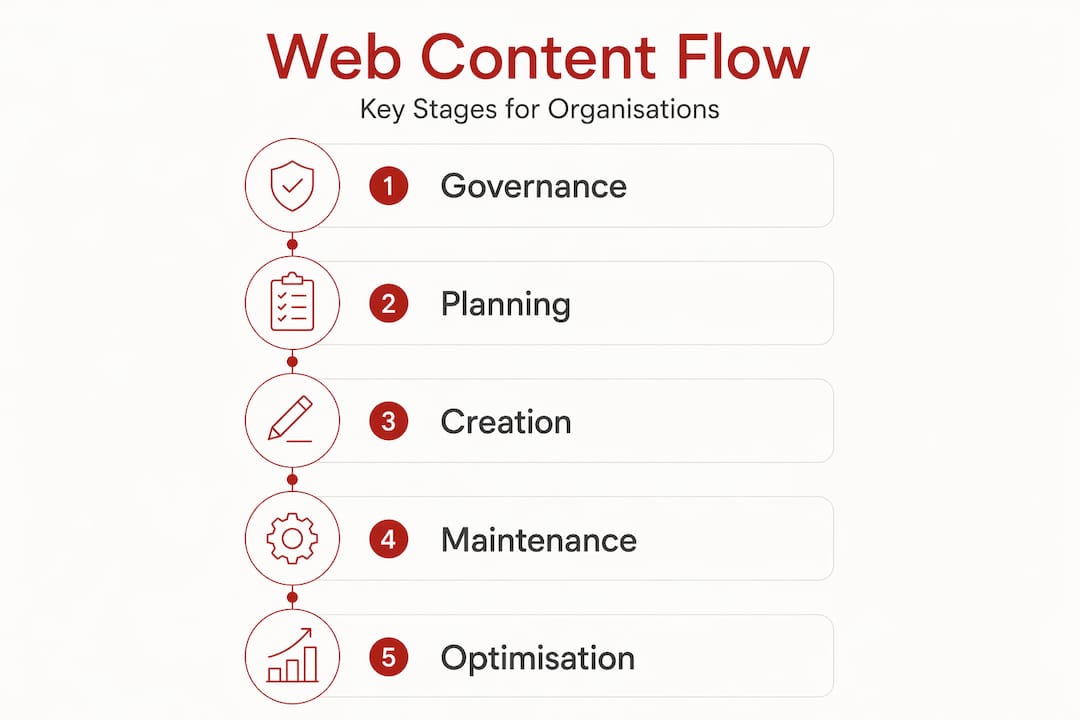
Effective content management begins before a single page is written. Content managers at community organisations need a shared understanding of the content lifecycle, which typically moves through planning, creation, review, publishing, maintenance, and eventual archiving or removal. Without this framework, content accumulates without accountability.
Content governance refers to the policies, roles, and processes that determine who creates, approves, publishes, and retires content. For high-trust organisations, governance is not optional. It protects the organisation from publishing outdated advice, inaccessible material, or content that conflicts with current policy. Content management is a continuous lifecycle requiring clear governance and a genuine willingness to prioritise or decline requests.
The tools that support this lifecycle fall into two main categories:
- Content Management Systems (CMS): Platforms such as WordPress, Craft CMS, or Statamic allow teams to create and publish content without coding. Selection should consider accessibility features, editor usability, and whether the platform supports structured content fields.
- Digital Asset Management (DAM) systems: These store and organise approved images, documents, and media files. A DAM reduces version control errors and ensures teams use current brand assets rather than outdated files.
| Tool type | Primary function | Key selection criteria |
|---|---|---|
| CMS | Create and publish web pages | Accessibility, editor usability, structured content |
| DAM | Store and manage digital assets | Version control, search, integration with CMS |
| Audit tools | Identify broken links and outdated content | Ease of use, reporting, scheduling |
Accessibility and sustainability should be treated as prerequisites at this stage, not as features to add later. Choosing a CMS that enforces alt text fields or flags missing headings makes compliance easier to maintain over time.
Pro Tip: Before selecting a CMS, map the actual editing tasks your team performs each week. A platform that suits a developer may create friction for a part-time content coordinator with limited technical confidence.
Planning and organising content effectively
Many community organisations operate with small teams and distributed responsibilities. Content is often created by subject-matter experts across departments who have limited time and no formal publishing training. This makes planning and organisation particularly important.
A practical starting point is deciding on a governance model. Three common approaches exist:
- Centralised model: A single content team or coordinator controls all publishing. This suits smaller organisations where consistency is the priority and volume is manageable.
- Distributed model: Individual departments own their content with a central team providing templates and guidelines. This scales better but requires clear accountability structures.
- Hybrid model: Departments draft content, but a central team reviews and publishes. This balances speed with quality control and works well for most mid-sized community organisations.
Regardless of model, clear content roles and workflows are what prevent content silos from forming. Assign an owner to every page or section, not just at creation but for ongoing maintenance.
Organising content for findability requires consistent categorisation and tagging. Use a controlled vocabulary for tags rather than allowing free-form labelling, which quickly becomes inconsistent. Structure navigation around how users think about tasks, not how the organisation is structured internally. These two rarely align.

Knowing your audience fully before writing is the most critical step in producing useful content. Content that addresses a specific need and guides readers toward a clear next step performs better than content written to satisfy internal stakeholders. This is especially true for community organisations where constituents often arrive with urgent, practical questions.
Embedding brand intelligence into the content creation process early, including approved language, tone guidelines, and asset libraries, reduces manual errors and version control issues as teams scale.
Pro Tip: Create a one-page brief template for every new content request. It should capture the audience, the purpose, the primary action you want readers to take, and the owner responsible for keeping it current. This single step prevents most content problems before they start.
Maintenance and quality assurance
Content that is not maintained loses credibility. A broken link, an out-of-date service detail, or an inaccessible PDF on a high-traffic page can undermine confidence in an organisation more quickly than a poor first impression.
A practical maintenance programme includes three components:
- Content audits: A structured review of all published content to identify ROT: material that is redundant, outdated, or trivial. Audits do not need to be exhaustive annually. A rolling audit, reviewing one section per month, is more sustainable for small teams.
- Monthly QA checks: QA checks can be completed effectively in just a few hours per month with a cross-functional team. Focus on broken links, accessibility issues such as missing alt text or poor colour contrast, and content that no longer reflects current services or policy.
- Stakeholder feedback loops: Surveys, support enquiries, and direct feedback from service users often surface content problems that automated tools miss. Build a simple process for routing this feedback to content owners.
Setting realistic maintenance cadences matters. A team of two cannot audit 500 pages quarterly without other work suffering. Prioritise high-traffic and high-risk pages first: contact pages, eligibility information, booking forms, and anything that triggers a compliance obligation.
Managing web content well is not about producing more. It is about maintaining what exists with enough discipline to keep it accurate, accessible, and genuinely useful to the people who rely on it.
Pro Tip: Use your CMS to set a review date on every published page. When a page reaches its review date, it should automatically move to a draft or flagged state until the owner confirms it is current. This prevents outdated content from staying live simply because nobody noticed.
Optimising for performance, accessibility, and search
Once content is well-organised and maintained, optimising it for discoverability and performance becomes the focus. These two goals are closely linked.
Websites scoring 90 or above on Lighthouse consistently outrank lower-performing equivalents in search results. Technical improvements such as server-side compression, modern image formats like WebP and AVIF, and deferred JavaScript loading can move a site from a score in the 60s to the 90s without requiring a full redesign. These changes also reduce data transfer, which aligns with sustainability goals.
For an SEO content workflow suited to community organisations, the key SEO fundamentals to apply during content creation are:
- Writing descriptive, accurate page titles and meta descriptions within the CMS
- Using heading structures (H1 through H3) to reflect genuine content hierarchy, not visual styling
- Writing meaningful link text rather than “click here” or “read more”
- Adding alt text to all images that carry information
Accessibility is both a legal obligation and a commercial asset. UK disabled households represent £274 billion in spending power, and accessible content also performs better in AI-driven search results. For community organisations serving diverse populations, accessibility is not a values statement. It is a functional requirement.
When measuring the results of content improvements, avoid evaluating performance too quickly. Content updates take 3 to 8 weeks to stabilise in search results. Checking rankings daily after a page update produces misleading data and can lead to unnecessary changes that interrupt any progress already underway.
Pro Tip: Before investing in new content, run a Lighthouse audit on your ten most-visited pages. Technical performance issues on high-traffic pages have more measurable impact than producing additional content on a slow or inaccessible site.
Coordinating teams and workflows
Even well-structured governance models can stall if the people involved do not have clear communication and shared decision-making processes. Content management across teams requires deliberate coordination.
The benefits of different team structures vary:
- Centralised teams produce more consistent output but can become bottlenecks if the volume of requests exceeds capacity.
- Distributed teams respond faster to departmental needs but create inconsistencies without strong guidelines and regular calibration sessions.
- Hybrid models succeed when the central team acts as editors and quality guardians rather than gatekeepers who slow down publishing.
Cross-functional input improves content quality in ways that an isolated content team cannot replicate. Service delivery staff understand what questions constituents ask. Finance teams flag compliance-sensitive language. Lived experience advisers identify assumptions embedded in the copy. Building lightweight feedback channels between these groups and the content team produces better content with fewer revisions.
For iteration and improvement, consider scheduling quarterly experience reviews: short sessions where content owners examine analytics, user feedback, and search data together. These do not require specialist researchers. A content manager who reviews which pages generate support enquiries or have high exit rates can identify priorities without complex analysis.
Content demand continues to grow, with 99% of large enterprises having increased content output over a two-year period. Community organisations face the same pressure with fewer resources. The response is not to produce more content faster. It is to maintain what exists more deliberately while declining low-impact requests that consume capacity without serving organisational goals.
For guidance on aligning website updates with organisational priorities, an editorial calendar tied to programme cycles and reporting periods is more useful than publishing on an ad hoc basis.
Perspective: what actually works in practice
In my experience working with high-trust organisations, the most common failure point in content management is not a tool selection or a technical gap. It is the absence of governance embedded in the organisation’s culture from the beginning.
Teams often build governance frameworks after content problems become visible. By then, hundreds of pages may be orphaned, accessibility issues are systemic, and no single person feels ownership. Retrofitting governance at that point is slow and demoralising. Starting with even a minimal ownership structure, a review cadence, and a brief template changes what is possible.
What I’ve also found is that organisations frequently underestimate the relationship between accessibility and trust. When a community member cannot access a PDF, cannot read a page with a screen reader, or cannot complete a form on a mobile device, they do not interpret it as a technical problem. They interpret it as an indication of how the organisation regards them. That is a reputational issue, not just a compliance one.
Finally, I’ve seen content managers pressured to demonstrate rapid performance gains from SEO and content work. The reality is that stable, well-structured, accessible content consistently outperforms churn over time. Patience with metrics is not passivity. It is sound methodology.
— Ben
How Marzipan supports content-managed community sites
Marzipan works with community organisations in Sydney and across Australia to build and maintain websites that are genuinely manageable. From sustainable website rebuilds designed around long-term content stewardship, to digital marketing services that align with accessible and ethical content practices, the work is built around your organisation’s values rather than against them. If your team is managing an ageing site or building content workflows from the ground up, exploring how technical and editorial support can reduce the burden on in-house teams is a practical next step. Visit Marzipan to see how the services fit together.
FAQ
What is the first step in managing web content effectively?
Establish content governance before creating new material. This means assigning page ownership, defining a review cadence, and setting publishing workflows appropriate for your team’s size and structure.
How often should community organisations audit their web content?
A rolling audit, reviewing one section per month, is more sustainable than an annual review for small teams. Prioritise high-traffic and compliance-sensitive pages first.
Why does accessibility matter for web content management?
Accessibility is a legal requirement in many jurisdictions and a commercial necessity. Accessible content also performs better in AI-driven search results, and inaccessible pages can erode constituent trust.
How long should teams wait before evaluating content performance changes?
Content improvements typically take 3 to 8 weeks to stabilise in search rankings. Evaluating results before that window closes produces unreliable data.
What content management tools do community organisations need?
Most teams need a CMS that supports accessible structured content, a basic digital asset library, and an audit tool to identify broken links and outdated pages. Complexity beyond that depends on team size and content volume.


