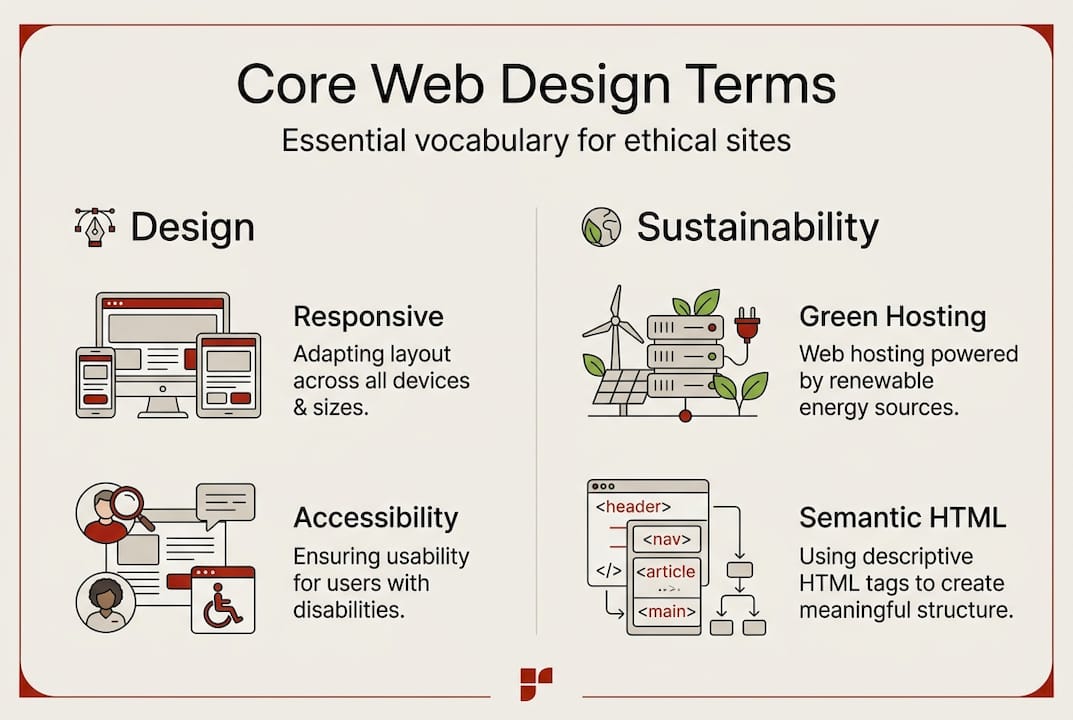
`) that describe the purpose of content. Screen readers and search engines both rely on semantic HTML to understand your pages. It’s a quiet but powerful tool for design for all users.
Green Hosting refers to web hosting powered by renewable energy or offset programmes. It’s one of the most direct ways a community organisation can reduce its digital carbon footprint.
| Term |
Definition |
Real-world impact for CBOs |
| Responsive Web Design |
Layouts adapt fluidly to any screen size |
More mobile users can access your services |
| Accessibility |
Content usable by people with disabilities |
Legal compliance and broader community reach |
| CSS |
Controls visual styling of your site |
Consistent, on-brand presentation |
| Semantic HTML |
Meaningful tags that describe content structure |
Better screen reader support and SEO |
| Green Hosting |
Hosting powered by renewable energy |
Lower carbon footprint aligned with your values |
Understanding ethical SEO guidance alongside these terms gives you a complete picture of what a responsible, high-performing site looks like.
Pro Tip: When briefing a web designer, ask specifically whether the site will be built mobile-first. This means the design starts with the smallest screen and scales up, which produces better performance and accessibility outcomes than designing for desktop and shrinking down.
Comparing responsive and adaptive design approaches
Choosing how your site handles different screen sizes is one of the most consequential decisions in a web project. Two main approaches exist: responsive and adaptive. They sound similar but work very differently.
Responsive design uses fluid CSS to create a single layout that stretches and rearranges itself based on screen width. One codebase, infinite flexibility. Adaptive design uses fixed layouts built for specific screen sizes (say, 320px, 768px, and 1024px). The server detects the device and serves the matching layout.
Responsive design is preferable to adaptive for single codebases and better accessibility, making it the stronger choice for most community organisations.
| Feature |
Responsive design |
Adaptive design |
| How it works |
Fluid CSS scales to any screen |
Fixed layouts for set breakpoints |
| Codebase |
Single codebase |
Multiple layouts required |
| Accessibility |
Generally stronger |
Can miss edge cases |
| SEO impact |
Preferred by Google |
Can cause duplicate content issues |
| Cost to build |
Lower upfront |
Higher, more complex |
| Best for |
Most CBOs and nonprofits |
Large platforms with specific device needs |
Key takeaways for community organisations:
- Responsive is almost always the right choice for organisations with limited budgets and broad audiences.
- Accessibility benefits are stronger with responsive design because content reflows naturally rather than being cut off.
- SEO implications favour responsive design. Google recommends it because it avoids duplicate content and simplifies crawling.
- Cost efficiency matters. One codebase means lower maintenance costs over time.
For a deeper look at how design choices affect your search visibility, explore the website SEO benefits that come from getting the technical foundations right.
Accessibility isn’t a feature you add at the end. It’s a design principle you build from the start. For Sydney community organisations serving diverse populations, including people with disabilities, older residents, and those using assistive technology, it’s non-negotiable.
WCAG 2.1 outlines accessibility guidelines across three levels (A, AA, and AAA) that help ensure content is usable for all. The framework is built on four core principles, known as POUR:
- Perceivable: Users can see or hear your content, even with assistive technology.
- Operable: All functions work via keyboard, not just a mouse.
- Understandable: Language is clear, forms give helpful error messages, and navigation is predictable.
- Robust: Content works across different browsers, devices, and assistive technologies.
Here are practical steps to meet core WCAG AA criteria:
- Check colour contrast. Text must have a contrast ratio of at least 4.5:1 against its background. Free tools like WebAIM’s Contrast Checker make this easy.
- Enable text resizing. Users should be able to increase text size to 200% without losing content. Reflow, resize text and orientation are key for an accessible user experience.
- Use logical heading structure. H1 for the page title, H2 for main sections, H3 for subsections. Screen readers navigate by headings.
- Add alt text to images. Every meaningful image needs a text description. Decorative images should have empty alt attributes.
- Ensure keyboard navigation. Tab through your site. If you can’t reach every link and button without a mouse, there’s a problem.
“Sydney community organisations should aim for WCAG AA as a minimum standard. It covers the most common accessibility barriers and is the level referenced in Australian accessibility guidance. AAA is aspirational but not always achievable for all content types.”
Meeting these standards also helps you improve Google ranking ethically, since many accessibility improvements overlap with SEO best practices.
Pro Tip: Use the free WAVE tool (wave.webaim.org) to run a quick accessibility audit on your existing site. It highlights errors, alerts, and structural issues in a visual overlay directly on your page. No technical knowledge required.
Sustainable and ethical web design: Green hosting, content strategy, and SEO basics
Putting these principles into practice means making deliberate choices at every stage of your web project. Sustainability and ethics aren’t abstract ideals; they show up in the hosting provider you choose, the images you upload, and the SEO tactics you approve.
The average web page generates roughly 0.5g of CO2 per page view. Scale that across thousands of monthly visitors and your website’s environmental footprint becomes significant. Hosting choices impact CO2 output, and Australian providers like Digital Pacific support carbon neutrality, making them a practical option for Sydney CBOs.
Here’s how to build a lower-carbon, accessible, and ethical website in practice:
- Choose green hosting. Look for providers using renewable energy or verified carbon offsets. Explore green hosting options suited to Australian organisations.
- Optimise images. Large, uncompressed images are one of the biggest contributors to page weight and carbon output. Use modern formats like WebP and compress before uploading.
- Minimise unnecessary scripts. Every third-party plugin or tracking script adds page weight and slows load times. Audit regularly.
- Write for humans first. Clear, honest content that genuinely serves your audience is the foundation of ethical SEO.
- Conduct regular audits. An SEO audit for mission-driven sites helps you spot technical issues before they affect your visibility or user experience.
White hat SEO aligns with mission, focusing on trust, E-E-A-T (Experience, Expertise, Authoritativeness, Trustworthiness), and guideline-driven optimisation. For community organisations, this approach is a natural fit. You’re not trying to game an algorithm; you’re trying to connect with the people who need your services.
Sustainability extends beyond your server. Content strategy, page structure, and even the fonts you choose all contribute to a site’s overall footprint and usability. Every decision is an opportunity to act in line with your values.
Ready to build a website that reflects your mission?
Understanding web design terminology is the first step. Putting it into practice with the right partner is where the real impact happens.
At Marzipan, we work with community organisations across Sydney to build websites that are accessible, sustainable, and genuinely effective. We combine ethical AI, green hosting guidance, and performance-driven SEO to create sites that don’t just look good but do good. Whether you’re starting from scratch or rethinking an existing site, we’d love to help you build something that scales your impact without compromising your values. Get in touch with us to start the conversation.
Frequently asked questions
What is the difference between responsive and adaptive web design?
Responsive design uses one flexible layout that scales to any screen, while adaptive design creates fixed layouts for specific device sizes. For most community organisations, responsive uses fluid CSS and is the more accessible and cost-effective choice.
How do accessibility standards apply to small community organisations?
WCAG guidelines apply regardless of organisation size. WCAG 2.1 levels ensure websites work for users with disabilities, and meeting AA standard protects you legally while making your site genuinely inclusive.
What makes web hosting ‘green’?
Green hosting uses renewable energy sources or verified carbon offsets to power its servers. Australian providers like Digital Pacific support carbon neutrality, making them a strong choice for values-aligned organisations.
Why does ‘ethical SEO’ matter for nonprofits?
Ethical SEO builds long-term trust and avoids manipulative tactics that can damage your credibility or result in search penalties. White hat SEO focuses on trust and mission alignment, which is a natural fit for community-driven work.
Recommended